
 English
 Arabic
 Chinese (Simplified)
 Dutch
Dutch French
 German
 Italian
 Portuguese
 Russian
 Spanish
The generative video space has a dirty secret that no single-model vendor wants to admit. Every new release promises to be the one the model that finally solves physics, character consistency, or cinematic coherence. Yet creators find themselves rotating through subscriptions like seasonal wardrobes, never quite sure which model will handle their specific shot type, subject matter, or style requirement.
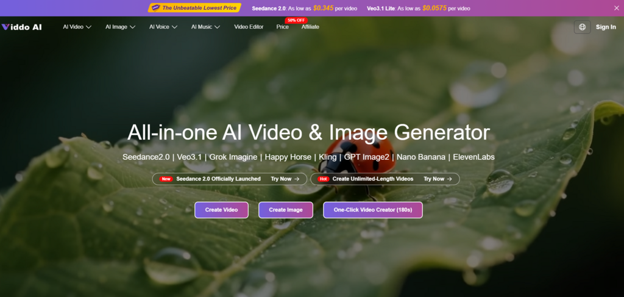
The industry has solved the problem of generating video from text. It has not solved the problem of knowing which generator to use for which job. AI Video Generator enters this conversation not as another model claiming superiority, but as an attempt to make the existing ecosystem navigable. The proposition is refreshingly practical: instead of asking which model is best, ask which model is best for this particular prompt, this particular subject, this particular deadline.
The Real Cost of Model Hopping
Every creator who has worked with AI video knows the rhythm. A new model drops with impressive demo reels. You subscribe, learn its prompt quirks, run a few successful generations, and then hit a wall. The model that excelled at landscape pans produces wobbly human figures. The model that handled character animation beautifully struggles with product close-ups. So you subscribe to another. And another.
The Hidden Tax on Creative Work
The financial cost of multiple subscriptions is obvious. The less obvious cost is cognitive. Each model has its own prompt syntax, its own parameter names, its own expectations about how to describe motion, lighting, and camera work. Switching between them means switching mental models. A prompt that works brilliantly in one interface produces gibberish in another. The platform consolidates over twenty models including Veo 3.1, Runway Gen-4, Kling V3.0, Seedance 2.0, Wan 2.7, Midjourney, and Grok Imagine, among others. The value is not in the count. The value is in the consistency of the interaction layer across all of them.
A Practical Test: Two Models, One Prompt, Two Very Different Results
To understand what consolidation actually buys you, I ran a side-by-side test that no single-platform user could run without switching tabs, logging in and out, and translating their prompt between different interfaces. The prompt was a Google Veo 3 example from the site: a mysterious cloaked figure glides through a rain-soaked, dim alley, neon shimmering on wet cobblestones, a lightning flash baring intense eyes.
Running the Same Prompt Through Seedance 2.0 and Veo 3.1
Viddo AI’s model selection panel lists Seedance 2.0 with a notable label: “Fast Generation, No Queue | Support Real People”. I ran the alley prompt through Seedance 2.0 first. The generation started almost immediately—the “no queue” claim held. The output arrived in under two minutes. The alley was atmospheric, the neon reflections on wet stone were convincing, and the figure moved with a fluidity that felt appropriate for the genre. The lightning flash was well-timed. The figure’s face remained partially obscured, which matched the mood but also masked the model’s handling of facial detail.
I ran the same prompt through Veo 3.1 next. The generation took noticeably longer—closer to four minutes. The output was more cinematic in a specific way: the camera lingered on the cobblestones a beat longer, the rain had more variation in droplet size, and the figure’s cloak moved with more fabric simulation. The trade-off was clear. Seedance 2.0 delivered speed and adequate quality. Veo 3.1 delivered superior visual polish at the cost of time.
What the Comparison Reveals
Viddo AI did not declare a winner. It presented both options and let the output speak. For a social media clip where turnaround time matters more than cinematic nuance, Seedance 2.0 was the practical choice. For a film project where every frame gets scrutinized, Veo 3.1 justified the extra minutes. The ability to make that choice within the same interface, using the same prompt structure, with the same download workflow, is the platform’s actual differentiator. Viddo AI does not claim to make every model perform identically. It claims to make every model equally accessible.
Breaking Down the Four-Step Workflow
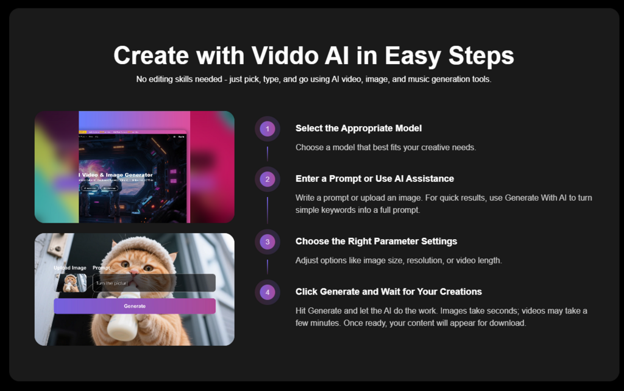
The platform documents its creation process in four steps, and the interface follows this sequence without deviation.
Step 1: Select the Appropriate Model
The model selection panel displays available options with clear labels. The choices during my testing included Seedance 2.0, Veo 3.1, Kling V3.0, Runway Gen-4, Wan 2.7, and several others. Each model is listed with its name. Seedance 2.0 carries the additional note about fast generation and no queue. The platform does not force a recommendation, which places the responsibility on the user to know which model suits their needs. In practice, this means experimenting. For my first few tests, I generated the same prompt across three different models to compare results.
Learning Through Comparison
Viddo AI’s design encourages this kind of experimentation. Because the prompt input, parameter settings, and generation button remain identical regardless of which model you select, running A/B tests across models takes minimal effort. The learning happens organically: after a few rounds, you develop a sense of which model handles human figures, which handles landscapes, and which handles product close-ups. The platform does not provide a recommendation engine for model selection, which is a gap, but the low friction of switching makes self-discovery feasible.
Step 2: Enter a Prompt or Use AI Assistance
The prompt input area accepts either a detailed text description or an uploaded image. For users who prefer a guided approach, a “Generate With AI” button transforms simple keywords into a fuller prompt. I tested this feature with the keywords “cyberpunk street rain” and received an expanded prompt that included lighting conditions, camera angle, and mood descriptors. The expanded version was not as detailed as a manually crafted prompt, but it was a useful starting point for quick experiments.
The AI Assistance Trade-Off
The AI assistance feature lowers the barrier for new users who may not know how to structure effective prompts. It produces serviceable results quickly. However, the most impressive outputs I generated came from manually written prompts that included specific camera instructions, negative prompts, and timeline details. The platform provides the tools to write good prompts, but it does not guarantee results from vague inputs.
Step 3: Choose the Right Parameter Settings
Parameter controls include image size, resolution, and video length. The options are presented as dropdowns and sliders rather than buried in an advanced settings panel. For video, the available aspect ratios included 16:9 and 9:16, which covers the primary needs for social media and traditional display. Resolution options ranged up to 1080p in my testing.
The Speed-Quality Equation
Adjusting these parameters has a direct effect on generation time. Higher resolution and longer duration increase processing time. The platform communicates this through a subtle status indicator. The trade-off is transparent: faster settings produce quicker results, while higher-quality settings require more patience. The platform does not exaggerate its speed claims; images took seconds, and videos took a few minutes, as stated.
Step 4: Click Generate and Wait for Your Creations
The generation button initiates the process, and the platform displays a progress indicator. Once complete, the output appears in the interface with a download option. The download process is straightforward—no complex export settings, no format selection, just a single click.
The Waiting Experience
During peak usage, the wait times varied. Seedance 2.0 lived up to its “no queue” claim and delivered results faster than the other models. Veo 3.1 and Runway took longer, which is consistent with their reputation for higher-quality output. The platform does not display an estimated time remaining, which would be a useful addition, but the progress bar provides enough feedback to know that the process is running.
Where the Aggregated Model Shines and Where It Stumbles
The platform’s strengths and limitations both stem from the same source: it is an aggregator, not a creator of models.
The Strengths: Choice, Speed, and Workflow Consistency
The most immediate benefit is the reduction in context-switching. Instead of managing five different subscriptions, five different prompt syntaxes, and five different download workflows, you manage one. The platform supports over twenty AI models and has accumulated 2.5 million users across 70 countries, which suggests that this aggregated approach resonates with a broad audience. The testimonials from creators across different disciplines point to the same conclusion: the value is not in any single output but in the reduction of friction across the entire creative process.
The Limitations: Model Selection Learning Curve and Output Variability
Viddo AI does not provide detailed guidance on which model excels at which type of content. New users may need to run multiple tests to understand the strengths and weaknesses of each option. This is a learning investment rather than a flaw, but it is a real consideration for users who want immediate results. Additionally, generative AI is probabilistic, and the platform does not claim otherwise. Running the same prompt twice may produce different results. For some workflows—brainstorming, iteration, experimentation—this is a feature. For workflows that require pixel-perfect reproducibility, it is a limitation.
A Side-by-Side Look at the Aggregated Approach
| Aspect | Aggregated Platform Experience | Single-Model Platform Experience |
| Model Access | 20+ models in one interface | One model per subscription |
| Learning Investment | Learn one interface, experiment with models | Learn each model’s interface separately |
| Workflow Efficiency | One login, one download process | Multiple logins, multiple workflows |
| Output Comparison | Easy to A/B test across models | Difficult to compare without switching |
| Use Case Flexibility | Switch models per project | Committed to one model per subscription |
The Practical Reality: Not Best, But More Useful
After working through multiple prompts across multiple models, the most accurate description is not that the platform produces the best AI videos. It produces the most accessible AI video workflow for creators who value options. The platform does not claim to have invented a superior model; it claims to have built a superior way to access existing models. That distinction matters.
For creators who have already committed to a single model and see no need to explore alternatives, the platform offers little advantage. For creators who find themselves juggling multiple subscriptions, learning multiple interfaces, and wishing for a single place to manage their generative work, the platform addresses a genuine pain point. The four-step workflow, the prompt assistant, the model variety, and the integrated audio capabilities create a workspace that feels designed for real production rather than for demonstration.
The platform reports that videos may take a few minutes while images complete in seconds. These are standard industry practices, presented without hype. The real value proposition is simpler: in a landscape where new models emerge every quarter and existing models update their capabilities continuously, a platform that aggregates rather than competes may be the most sustainable approach. It allows users to benefit from model improvements without migrating their entire workflow. It provides a hedge against any single model falling behind. And it reduces the cognitive load of creative work, leaving more mental space for what actually matters: the ideas themselves.