
 English
 Arabic
 Chinese (Simplified)
 Dutch
Dutch French
 German
 Italian
 Portuguese
 Russian
 Spanish
In today’s digital world, clean and professional-looking images are essential for social media, e-commerce, marketing, and personal branding. However, unwanted backgrounds, objects, or distractions often reduce image quality. This is where free AI photo remover tools are changing the game.
Instead of spending time on complex software like Photoshop, AI-powered tools now allow users to remove backgrounds and objects in seconds. One of the emerging tools in this space is RemoverAI, which focuses on fast, simple, and high-quality image cleanup using artificial intelligence.
Understanding AI Photo Removal Technology
A free AI photo remover is an online tool that uses artificial intelligence to automatically detect and remove unwanted elements from images. These elements can include:
- Backgrounds
- Objects
- People
- Text or watermarks
- Visual clutter
AI analyzes the image and reconstructs the missing area to make the result look natural and seamless.
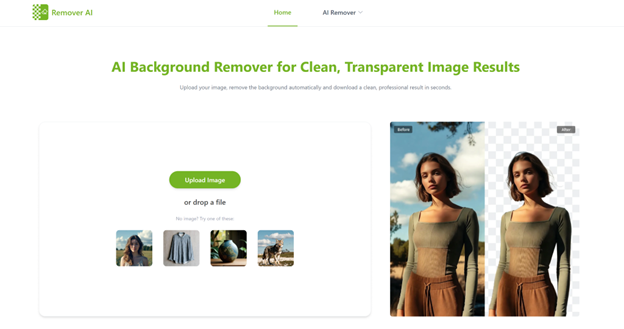
This process is often powered by advanced techniques such as image segmentation and AI inpainting.
Step-by-Step Process of AI-Based Image Cleaning
Tools like RemoverAI simplify the entire editing process into a few steps:
- Upload your image
- Select the background or object you want to remove
- Let AI process and rebuild the image
- Download the cleaned result
The AI automatically identifies edges, textures, and lighting to ensure the final image looks realistic.
Reasons Behind the Popularity of Free AI Photo Removers
The demand for free AI photo remover tools is growing rapidly due to several benefits:
Why Students Using AI for Essays Are Not Improving Their English
Beginner-Friendly Experience
No editing experience is required. Anyone can remove objects in seconds.
Instant Processing Speed
AI completes complex edits in just a few seconds.
No Cost Barrier
Many platforms, including RemoverAI, offer free usage options.
Professional-Level Output
Even beginners can produce clean, studio-quality images.
Browser-Based Convenience
Most tools work directly in the browser without installation.
AI Background Removal Capabilities Explained
One of the most common uses of free AI photo remover tools is background removal.
For example:
- Product photos can be placed on white backgrounds
- Profile pictures can be cleaned for professional use
- Marketing visuals can be made more appealing
RemoverAI helps users remove backgrounds automatically while preserving the subject with high accuracy.
How AI Removes Unwanted Objects from Images
AI photo removers are also powerful for eliminating unwanted objects such as:
- Strangers in travel photos
- Power lines or poles
- Shadows or reflections
- Random objects in product shots
The AI fills in the removed area by analyzing surrounding pixels, making the edit almost invisible.
Core Features of Modern AI Photo Removal Tools
Most free AI photo remover platforms provide essential features such as:
- One-click background removal
- Smart object detection
- High-resolution export
- Edge refinement tools
- Browser-based editing
RemoverAI integrates these features into a simple interface designed for both beginners and professionals.
Practical Applications in Real Life
AI photo remover tools are widely used across different fields:
Online Stores and E-commerce
Clean product images for better conversions and listings.
Social Media Content Creation
Remove distractions for more engaging visuals.
Photography Enhancement
Improve portraits and landscape images.
Real Estate Listings
Present clean and attractive property visuals.
Digital Marketing
Create professional visuals for ads and branding.
Benefits of Using RemoverAI Platform
RemoverAI is designed to make photo editing accessible and efficient.
Key advantages include:
- Fast AI-powered processing
- Simple and beginner-friendly interface
- High-quality image output
- No technical skills required
- Free access for basic usage
It allows users to achieve professional-level edits without expensive software.
Current Limitations of Free AI Tools
Although powerful, free tools may have some limitations:
- Limited features in free versions
- Slight imperfections in complex backgrounds
- Reduced resolution for free exports
However, tools like RemoverAI continue improving as AI technology evolves.
Future Development of AI Photo Removal Technology
The future of free AI photo remover tools looks very promising. We can expect:
- More accurate object detection
- Real-time editing capabilities
- Better background reconstruction
- Integration with mobile apps and design platforms
AI tools like RemoverAI are leading this transformation by making photo editing faster and more accessible.
Final Thoughts
Free AI photo remover tools are revolutionizing the way images are edited. What once required advanced skills in Photoshop can now be done in seconds using AI.
With platforms like RemoverAI, users can easily remove backgrounds and unwanted objects to create clean, professional-quality images without any cost or technical difficulty.
As AI continues to advance, these tools will become even more powerful, making professional editing accessible to everyone.