
 English
 Arabic
 Chinese (Simplified)
 Dutch
Dutch French
 German
 Italian
 Portuguese
 Russian
 Spanish
Giving presentations in English can feel intimidating—especially if English isn’t your first language. But with the right phrases, structure, and preparation, you can deliver your message clearly and confidently.
This guide breaks it all down: what to say at each stage, how to sound natural, and how to connect with your audience in a professional setting.
How To Start a Presentation (With Tips and Examples)
Why Presentations in English Are Challenging (But Possible)
Presenting isn’t just about grammar—it’s about confidence, pacing, and audience connection. The most common challenges include:
- Forgetting what to say
- Speaking too quickly or too softly
- Not knowing how to start or end
- Worrying about pronunciation or mistakes
This guide helps you solve those problems with practical tools.
How to go from A1 to C2 Quickly & Correctly
Structure of a Clear Presentation in English
- Greeting & Introduction
- “Good morning everyone, thank you for being here.”
- “Today I’ll be talking about…”
- “Let me quickly introduce myself…”
- Overview / Agenda
- “I’ll start with… then move on to… and finally we’ll cover…”
- “This presentation will take about [X] minutes.”
- Main Points
- “First, let’s look at…”
- “Now, moving on to…”
- “Another important point is…”
- Summarize
- “To sum up…”
- “Here are the key takeaways…”
- Closing & Questions
- “Thank you for listening. Are there any questions?”
- “Feel free to reach out to me after this session.”
- A clear presentation follows a simple, logical flow that guides your audience from start to finish. By structuring your talk into sections, starting with how you introduce yourself in a presentation then moving through the agenda, main points, summary, and closing, you make it easier for listeners to follow and remember your message
How To Introduce a Presentation (With Examples and Tips)
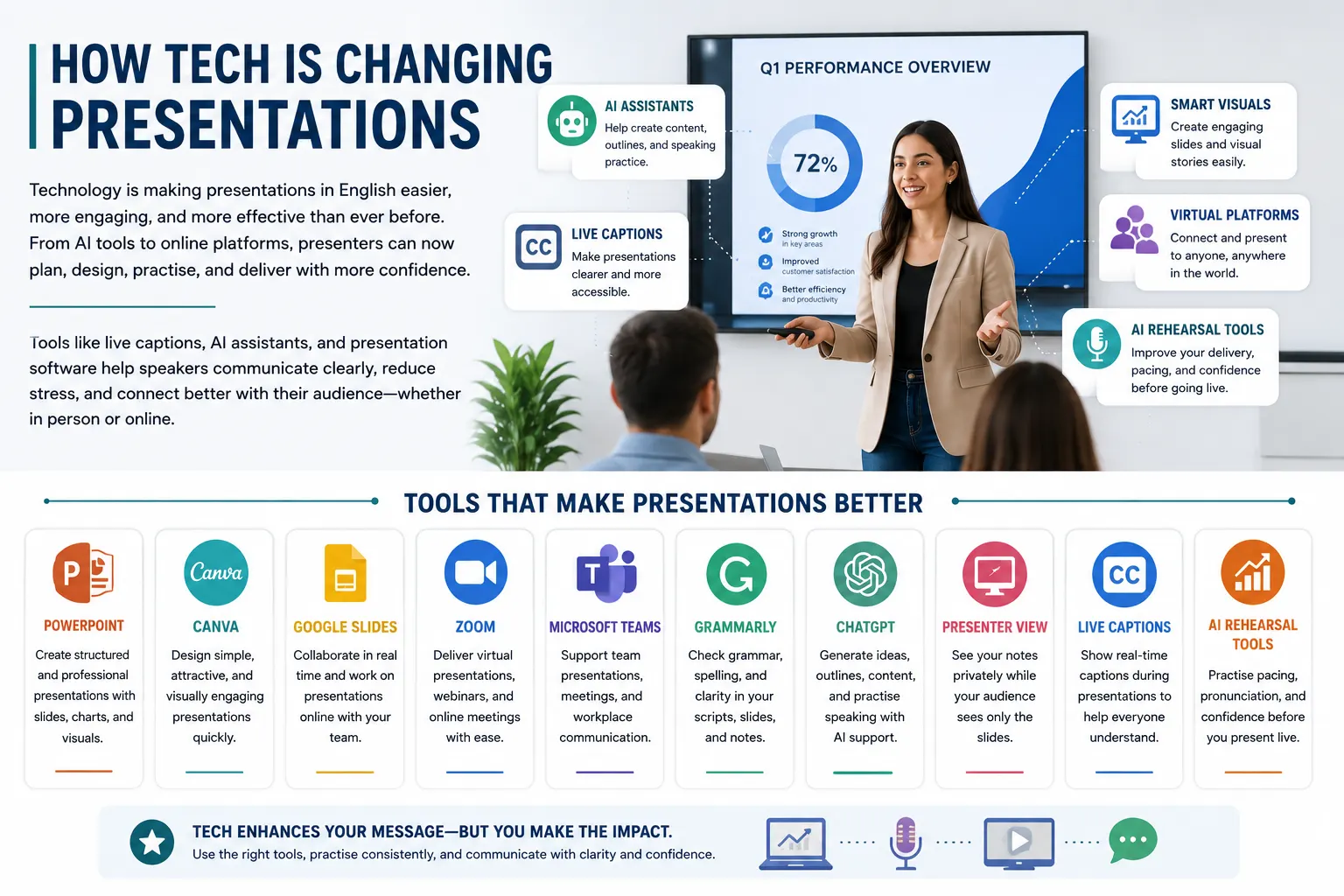
How is Technology and AI Changing Presentations in 2026
Technology is changing how people give presentations in English. Today, professionals use AI tools, live captions, presentation software, and virtual meeting platforms to communicate more clearly and confidently. Tools like PowerPoint, Canva, and Google Slides help presenters create cleaner visuals and organize information more effectively, while platforms like Zoom and Microsoft Teams have made online presentations a normal part of modern work. Many speakers also use AI writing assistants to improve presentation structure, simplify language, and prepare talking points before speaking.
The list of examples for reference:
PowerPoint
Used for creating structured professional presentations with slides, charts, and visuals.
Canva
Helps users design cleaner and more visually engaging presentations quickly.
Google Slides
Allows teams to collaborate on presentations online in real time.
Zoom
Used for virtual presentations, online meetings, and remote communication.
Microsoft Teams
Supports workplace presentations, video calls, and team collaboration.
Grammarly
Checks grammar, spelling, and clarity in presentation scripts and notes.
ChatGPT
Helps generate presentation ideas, outlines, speaking practice, and slide content.
Presenter View
Allows speakers to use private notes while presenting slides.
Live Captions
Displays subtitles during presentations to improve understanding.
AI Rehearsal Tools
Help speakers practise pacing, pronunciation, and presentation confidence before speaking live.
These tools are especially helpful for English learners because they reduce pressure and improve preparation. Features like automatic subtitles, pronunciation tools, speaker notes, and presentation rehearsal modes help users practise speaking more naturally before presenting in front of others. Technology does not replace communication skills, but it helps presenters feel more organized, confident, and prepared when speaking English in professional situations.
Useful Phrases for Presentations in English
Starting Strong
- “Let’s get started.”
- “I’m excited to talk about…”
- “This topic is important because…”
Managing Time and Flow
- “Let’s keep this brief.”
- “We’re a bit short on time, so I’ll move ahead.”
- “I’ll go into more detail in the next slide.”
Handling Questions
- “That’s a great question.”
- “I’ll answer that at the end if that’s okay.”
- “Let me clarify that…”
Staying Calm if You Forget
- “Let me rephrase that.”
- “Let me check my notes.”
- “Let’s move to the next part and I’ll come back to this.”
How to Easily Go From A2 to B1 in English
Practice Activity: Prepare Your Own Presentation in English
Choose a topic you know well (your job, a recent project, or a favorite subject).
- Write a short 3-minute presentation with:
- An introduction
- 2–3 main points
- A short summary
- A closing line
- Record yourself reading it aloud.
- Listen and improve pacing, pronunciation, and pauses.
- Practice in front of a mirror or friend.
- Deliver it again—clearer and more confidently.

Tips to Sound Natural When Giving Presentations in English
- Use your natural voice—not a robotic tone
- Smile when speaking—it affects how your voice sounds
- Pause for emphasis after important points
- Don’t memorize every word—know the flow instead
- Use simple, clear slides with only key points
Want to Give Great Presentations in English?
You don’t need perfect English to give a strong presentation. What matters is being clear, confident, and prepared. Join Learn Laugh Speak to build your presentation skills with guided practice and real phrases that work.
3 thoughts on “Full Guide for Presentations in English Made Easy”
Pingback: Give Professional Presentations in English Every Time
Pingback: How AI-Powered Creativity is Changing Modern Education - Learn Laugh Speak
Pingback: Subject Pronouns in English: Meaning, Examples and Usage - Learn Laugh Speak