
 English
 Arabic
 Chinese (Simplified)
 Dutch
Dutch French
 German
 Italian
 Portuguese
 Russian
 Spanish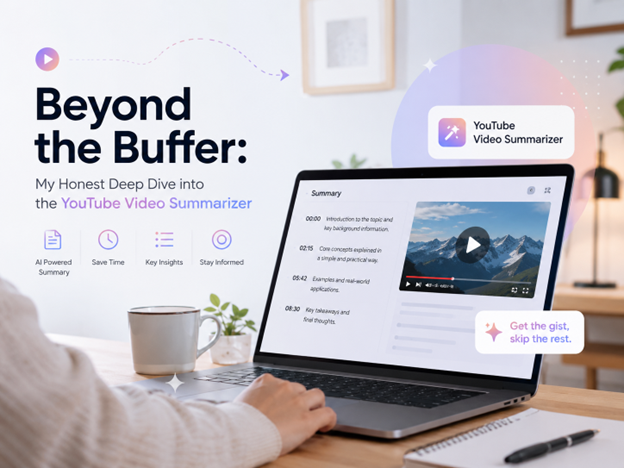
Let’s be real for a second. We have all been there. It’s 11 PM, you have a 45-minute video essay or a dense academic lecture queued up on YouTube that you need to watch for work or school. You hit play, grab a snack, and promise yourself you’ll focus. But ten minutes in, the creator is still doing their intro, the pacing is slow, or—let’s be honest—your attention span just isn’t having it today. You find yourself clicking around the timeline, desperately trying to find the “good stuff.”
This is exactly where I found myself a few weeks ago, drowning in a sea of tabs. That’s when I decided to stop fighting the algorithm and start working smarter. I turned to a YouTube Video Summarizer. If you haven’t tried one yet, or if you’ve been skeptical about AI tools, stick with me. I spent the last week putting a robust, browser-based AI Video Summarizer through its paces, and I’m ready to share the unfiltered truth about whether it’s actually worth your time.
What Exactly is a YouTube Video Summarizer?
In simple terms, a YouTube Video Summarizer is an AI-powered tool designed to summarize YouTue video content and spit out the key takeaways in a fraction of the time it takes to watch the whole thing. Think of it as having a super-smart friend who watches the video for you and texts you a bulleted list of everything that matters.
Under the hood, these tools usually rely on Automatic Speech Recognition (ASR) to grab the video’s transcript (or generate one if it doesn’t exist) and then use Natural Language Processing (NLP) to analyze the text. It identifies the core themes, filters out the fluff (like sponsor reads or rambling intros), and structures the information into something readable.
But why do we need this? Because content is infinite, and our time is not. Whether you are a student trying to cram for exams, a professional keeping up with industry trends, or just a curious soul who hates wasting time on clickbait, a summarizer acts as a gatekeeper for your attention.
The Real-World Value: Solving the “TL;DR” Problem
During my testing, the value proposition became immediately clear. It wasn’t just about saving time; it was about cognitive load management. Here is how this tool actually solves specific problems in daily life:
- The “Is This Worth Watching?” Test: I often click on videos based on a catchy thumbnail, only to realize the content is shallow. With a summarizer, I can get the gist in 30 seconds. If the summary looks weak, I close the tab. No guilt, no wasted 20 minutes.
- Targeted Learning: For educational content, I don’t always need the whole lecture. I might just need to understand “Quantum Entanglement” or “The causes of the French Revolution.” The summarizer highlights these keywords, allowing me to jump straight to the relevant timestamp.
- Language Barrier Breaking: I watch a lot of tech content from creators who speak English as a second language. Sometimes, heavy accents or fast talking make it hard to follow. The text-based summary cuts through the audio confusion, giving me clear, grammatically correct points.
My Hands-On Experience with the AI Video Summarizer
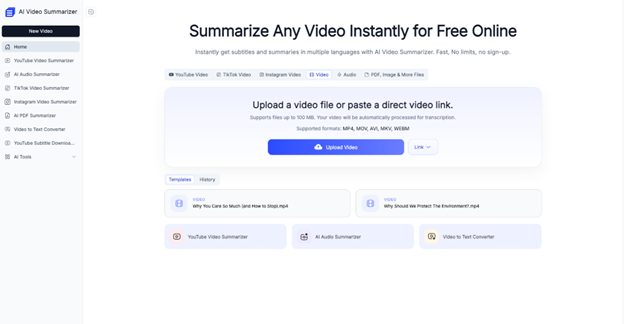
I decided to go deep with a specific web-based AI Video Summarizer to see how it holds up against real-world scenarios. I didn’t just test it on short clips; I threw a 2-hour podcast and a fast-paced tech review at it.
The Workflow: The interface was refreshingly minimalist. No cluttered dashboards or confusing settings. I simply copied the YouTube URL, pasted it into the input bar, and hit “Summarize.”
The “Aha!” Moment: What surprised me was the speed. Within about 15 seconds, the tool parsed a 40-minute video. But the real kicker was the Timestamp Notes. It didn’t just give me a wall of text; it linked specific bullet points to the exact moment in the video.
For example, when summarizing a review of the latest iPhone, the tool generated a point: “Camera low-light performance has improved by 20%.” Next to it was a clickable timestamp. I clicked it, and the video player jumped exactly to the night-sky photo comparison. It felt like magic. It bridged the gap between skimming and watching perfectly.
I also tested the Chat with Video feature (a common feature in top-tier summarizers). I asked, “What did the speaker say about battery life?” and the AI pulled a direct quote and summarized the sentiment. It felt less like using a search engine and more like interrogating the video itself.
️ The Good, The Bad, and The “It Depends”
To keep this review objective and transparent, I have to look at both sides of the coin. Here is the breakdown of the Pros and Cons based on my week of usage.
The Pros (Why you’ll love it):
- Completely Free & No Login Required: This was the biggest win for me. So many tools hit you with a paywall or force you to sign up with Google just to summarize one video. This tool let me jump right in. It respects your privacy and your wallet.
- Multi-Language Support: I tested it on a Spanish travel vlog (with auto-generated captions). The tool successfully extracted the locations and food recommendations and presented the summary in English. The translation layer was surprisingly accurate.
- Multiple Summary Templates: Depending on the video, I could switch modes. For a news clip, I used the “Bullet Points” mode. For a philosophical essay, I switched to “Paragraph” mode to get a more narrative flow.
- Customizable Depth: I appreciated the slider that lets you choose between a “Quick Gist” (3-4 sentences) and a “Detailed Breakdown.” It gives you control over how much detail you want to consume.
The Cons (Where it struggles):
- Reliance on Captions: If a video has no audio track or extremely poor auto-captioning (like a mumbling creator with no background music), the summary quality drops significantly. The AI can only work with what it can “hear.”
- Visual Context Blindness: While it captures the script perfectly, it sometimes misses visual jokes or on-screen text that isn’t spoken. In a tutorial where the creator says “Click here” but doesn’t say what “here” is, the summary can be a bit vague.
- Nuance Loss: In highly emotional or comedic content, the AI tends to be very literal. It captured the facts of a comedian’s story but completely missed the punchline’s timing and delivery, which is the whole point of comedy.
Final Verdict: Who is this For?
After living with this YouTube Video Summarizer for a week, my verdict is clear: this is an essential utility for the modern internet user, but it isn’t a replacement for the full experience.
This tool is perfect for you if:
- You are a Student: You need to extract facts from lectures without re-watching the whole hour.
- You are a Professional: You need to stay updated on industry news but have a packed meeting schedule.
- You are a Researcher: You need to vet sources quickly to see if a video is relevant to your work.
However, keep watching manually if:
- You are watching for pure entertainment (movies, comedy, vlogs) where the vibe is more important than the information.
- You are learning a physical skill (like yoga or painting) where seeing the movement is crucial.
My Advice: Don’t let the fear of missing out keep you scrolling. Give a YouTube Video Summarizer a try the next time you have a long video on your plate. It might just give you back hours of your life every week. And in 2026, time is the only currency that really matters.