
 English
 Arabic
 Chinese (Simplified)
 Dutch
Dutch French
 German
 Italian
 Portuguese
 Russian
 Spanish
I used to think I was just bad at follow-through.
Calls would end and I’d have this vague sense of what was discussed, a few notes I half-remembered taking, and a follow-up email I’d been putting off for two hours because I couldn’t quite remember who said what. I’d scrub back through recordings looking for one specific moment. I’d write up summaries from memory and send them hoping they were close enough.
Turns out I wasn’t bad at follow-through. I just hadn’t figured out that manually processing audio is one of the most quietly expensive things knowledge workers do, and almost nobody tracks it.
Where the Time Actually Goes
Think about your week for a second.
Meetings, client calls, recorded interviews, voice memos you left yourself while driving somewhere — for most people that’s easily four to six hours of audio. And almost all of it needs to end up somewhere. A document. A summary. A searchable record of what was decided.
Without an audio to text tool, here’s what that looks like in practice. You re-listen at 1.5x speed with a notepad. You scrub back and forth hunting for the one moment you half-remember. You write a summary forty-five minutes after the call ended, from memory, hoping you got it right. You send “per our discussion” follow-ups and feel vaguely uneasy about whether you actually got it right.
This doesn’t show up on anyone’s time audit. It’s not a category anyone tracks. It’s just there, week after week, eating maybe an hour or two that you’d probably not even be able to account for if someone asked.
What Changes When You Actually Use One
An audio to text tool takes a recording — a Zoom call, an MP3, a voice memo, a phone interview — and gives you a written transcript. The AI behind it is called automatic speech recognition. It’s gotten good enough in the past couple of years that the output is actually usable, not just technically impressive.
Accuracy on clean audio is around 95% with the better tools. On messier recordings it drops, but you’re still editing rather than typing from scratch, and those aren’t the same task at all. A 60-minute recording that used to eat most of an afternoon now comes back in under two minutes.
The better audio to text platforms also handle speaker diarization — figuring out who said what in a group recording and labeling it. Some do summarization. Some pull out action items. The category has moved a lot in a short time.
Who This Actually Helps
Writers use it to kill the blank page problem. Talk through an idea for ten minutes, run it through an audio to text tool, and there’s something to work with rather than nothing. I’ve written articles this way. First drafts, outlines, email sequences. Going back to typing everything cold feels slow now.
Researchers and journalists use it so they can actually pay attention during interviews. When you’re not scribbling everything down you can listen differently. You notice things. You follow up on the right stuff. The transcript gets the words. Paying attention gets everything else.
Managers use it to make meetings mean something after they’ve ended. Decisions are written down. Nobody’s relying on memory for what was agreed. New team members can read past transcripts instead of asking someone what happened six months ago.
Sales teams use transcribed calls to collect what customers actually say — not a paraphrased version in a CRM note, the real words. How they describe what’s wrong, what objections keep coming up. Useful in a way that summaries aren’t.
Things Worth Knowing Before You Start
Recording quality matters more than which audio to text tool you pick. A cheap USB microphone in a quiet room does more for accuracy than any software upgrade. If the output keeps being bad, check the recording setup before blaming the tool.
Review the output before you use it. At 95% accuracy a 60-minute file still has errors in it. Names, technical terms, anything said fast or with an accent — those are the spots to check. Budget ten minutes per hour of audio. Worth it.
Don’t treat the transcript as finished. It’s raw material. Editing it is faster than writing from scratch but it’s still work. The skill develops quickly though.
Real-time transcription for live meetings and batch processing for recorded files are different use cases. Not every tool handles both equally. Worth knowing which one actually matters to you before you commit.
The Tool I Use
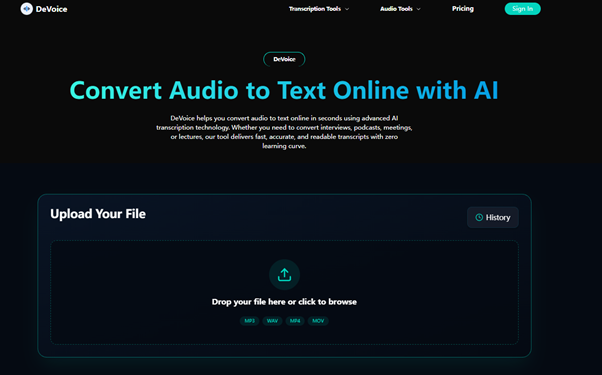
DeVoice. Nothing to install, runs in the browser, free tier that actually lets you test it on real files before paying anything.
I’ve run it on team calls, long interviews, podcast recordings, and a handful of files I was honestly a bit pessimistic about given the audio quality. The audio to text output has been consistently usable. Exports in .txt, .srt, .vtt, .docx — whatever format you need.
If you tried transcription software a couple of years ago and the results weren’t worth the cleanup effort, try again. DeVoice is where I’d start. The category has genuinely moved.
The Part That Took Me a While to Notice
The time savings are obvious pretty quickly. That part I expected.
What I didn’t expect was what happened to the material itself.
When every call has a transcript, you stop losing decisions in the noise of the week. When every interview is searchable, you stop hunting through recordings for moments you half-remember. When voice memos become text, the ideas you captured while driving actually make it somewhere instead of evaporating.
The audio to text tool isn’t really the point. The searchable record of your thinking is the point. The tool is just how it gets made.
I’ve been using this workflow consistently for about a year now. The hours saved in the first week were nice. What’s built up since then is something else — an actual archive of conversations and decisions I can search and reference and use. That wasn’t something I was aiming for when I started. It just happened as a side effect of doing this consistently.
Try It
Sign up for DeVoice, run your next call through it, see what comes back.
Try DeVoice free → No download. No card. First transcript in under two minutes.