
 English
 Arabic
 Chinese (Simplified)
 Dutch
Dutch French
 German
 Italian
 Portuguese
 Russian
 Spanish
Maintaining a fast, clutter-free, and secure PC requires more than just uninstalling unwanted software. Hidden files, stubborn programs, and unnecessary browser extensions often remain behind, consuming system resources and compromising privacy. That’s where IObit Uninstaller 15 comes in — a powerful uninstaller that goes beyond basic removal developed by IObit. This latest version not only deletes software but also features advanced tools like File Shredder and Browser Extension Cleaner, ensuring every trace of unwanted data disappears for good.
What Makes IObit Uninstaller 15 Stand Out
While Windows offers a built-in uninstaller, it rarely performs a complete cleanup. Leftover files, registry entries, and folders are often left behind, slowing down your PC over time. IObit Uninstaller 15 addresses these issues with a deep-cleaning engine and specialized modules that detect and remove traces other uninstallers miss.
With its modern interface and intelligent automation, IObit Uninstaller 15 does much more than just remove programs. It enhances your system’s health by offering tools like File Shredder for secure data deletion and Browser Extensions Manager for a safer, faster browsing experience.
The software’s Software Health, Install Monitor, Force Uninstall, and Bundleware Removal modules make it a complete system maintenance suite rather than just a traditional uninstaller.
Securely Deleting Data with File Shredder
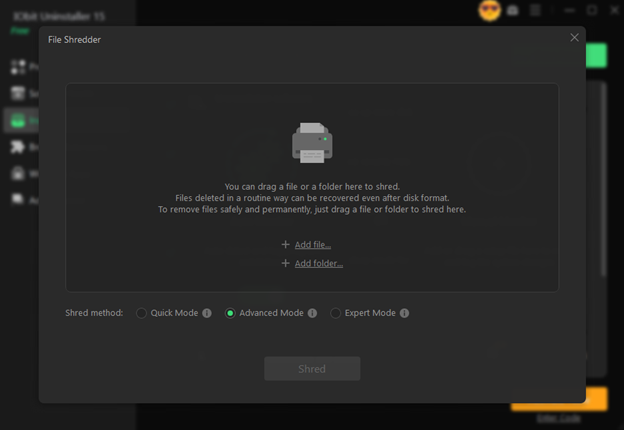
Even after deleting files manually, traces often remain on your hard drive and can be recovered using data recovery tools. That’s a major concern for users who handle confidential files, personal documents, or sensitive data. The File Shredder in IObit Uninstaller 15 ensures that deleted files are permanently destroyed beyond recovery.
How to Use File Shredder:
- Launch IObit Uninstaller 15.
- Navigate to the Tools section on the left-hand menu.
- Select File Shredder.
- Click + Add file or + Add folder to choose the items you want to delete permanently.
- After selection, click Shred to start the process.
Once the shredding is done, those files are irretrievable — even with advanced recovery tools.
Cleaning and Managing Browser Extensions
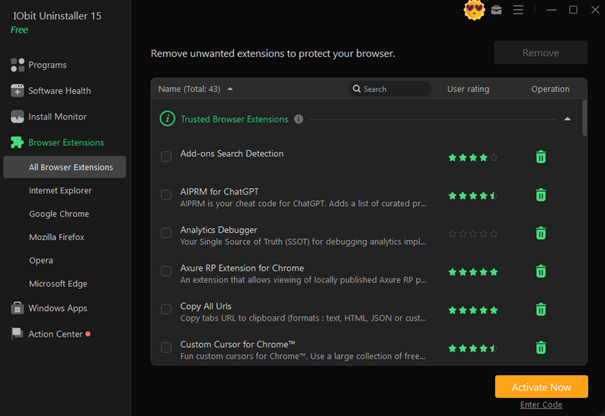
Modern browsers often accumulate dozens of extensions — some useful, others intrusive or even malicious. Unwanted add-ons can slow down browsing, compromise privacy, and open the door to spam or ads. The Browser Extensions manager in IObit Uninstaller 15 offers a centralized hub to review, manage, and remove these extensions safely.
How to Clean Browser Extensions:
- Open IObit Uninstaller 15 and go to the Browser Extensions tab.
- Select your browser (Chrome, Edge, Firefox, etc.) from the top bar.
- Review the list of installed extensions and plug-ins.
- Identify suspicious or unnecessary items — IObit may flag malicious ones automatically.
- Click the Remove or trash can icon next to each unwanted extension.
This tool not only improves browser performance but also helps maintain online security by eliminating potential threats like adware, pop-up generators, and phishing add-ons.
For users tired of intrusive ads and constant pop-up notifications, this feature is a true game-changer.
Why Choose a Third-Party Uninstaller Over Windows’ Default
Windows’ default uninstaller is serviceable for basic needs but lacks the precision and thoroughness required for complete software removal. Programs often leave behind:
- Registry entries
- Empty folders
- Temporary setup files
- Application shortcuts
These leftovers consume disk space and can cause performance issues or conflicts with future software installations.
IObit Uninstaller 15 takes full control of the process. It removes all components of a program — including hidden registry keys and startup items — ensuring no trace remains. It even creates a restore point before major changes, giving you the freedom to experiment without risk.
Other advantages include:
- Monitoring installations: Tracks new software installs and system changes.
- Force Uninstall+: Removes stubborn programs that resist deletion.
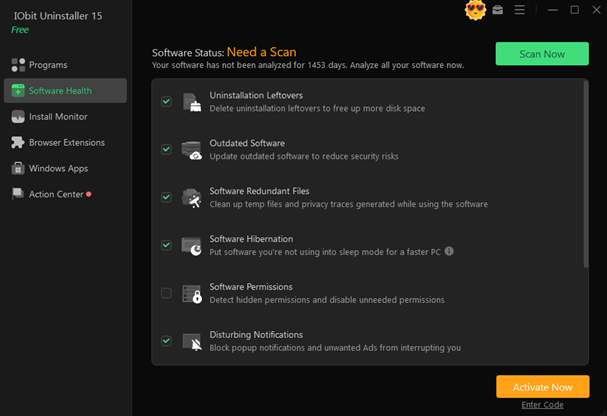
- Software Health Check: Detects outdated or harmful programs and browser plugins.
This level of control simply isn’t possible with Windows’ built-in tools.
The Hidden Problem: Adware and Bundleware
Many users unknowingly install extra programs when downloading free software. These “bundleware” applications often include adware, browser hijackers, or background services that slow down your computer.
IObit Uninstaller 15’s Bundleware Removal and Software Health features automatically detect and list these unwanted extras. With one click, you can remove them completely — no need to search manually through your directories.
Additionally, it helps you disable pop-up notifications from Windows apps and browsers, reducing distractions and protecting your system from unwanted web alerts.
Install Monitor: Keeping Track of Every Change
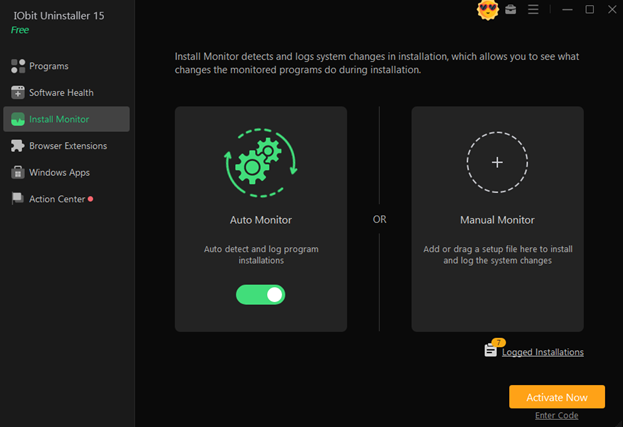
The Install Monitor feature records all changes made to your system during new software installations. This includes file paths, registry modifications, and startup items. If you ever need to uninstall the program later, IObit Uninstaller uses this log to remove every trace of it — something most uninstallers can’t do.
This is particularly useful for developers, testers, or power users who frequently install and remove software.
Force Uninstall+: The Ultimate Solution for Stubborn Apps
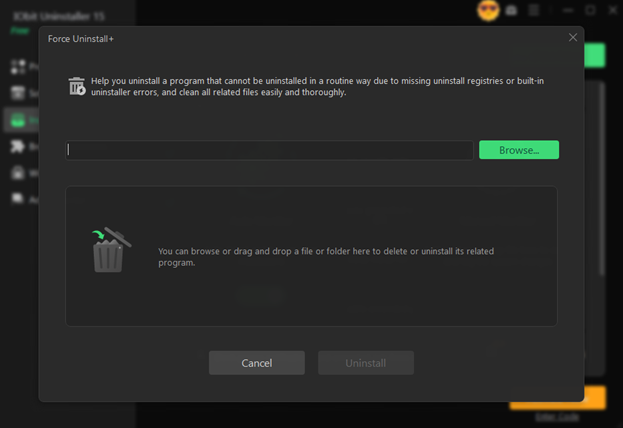
Certain programs resist normal uninstallation because they’re corrupted, incomplete, or designed to stay. Force Uninstall+ in IObit Uninstaller 15 bypasses these restrictions. It uses a smart scan to locate hidden files, locked folders, or broken registry entries related to the problematic program and wipes them completely.
This ensures your PC remains clean and responsive, even after removing tricky software.
Why IObit Uninstaller 15 Is Worth It
Whether you want to reclaim storage space, eliminate privacy risks, or just keep your system tidy, IObit Uninstaller 15 delivers on every front. It’s:
- Efficient: Uninstalls multiple programs in one go.
- Secure: Shreds sensitive files permanently.
- Comprehensive: Removes leftover data and browser junk.
- Smart: Monitors installations and prevents unwanted software.
It’s more than an uninstaller — it’s a complete PC maintenance toolkit that ensures your system stays fast, organized, and protected.
Final Thoughts
IObit Uninstaller 15 proves that uninstalling software doesn’t have to be limited to simple removal. With advanced tools like File Shredder and Browser Extension Cleaner, it provides users with total control over their system’s cleanliness and security.
From eliminating leftover files to safeguarding your privacy and optimizing browser performance, this powerful utility takes PC maintenance to a new level.
If you value efficiency, safety, and a truly clean computer, IObit Uninstaller 15 is a must-have tool for your Windows system.